
You’re standing in the kitchen, your child is fussy, and you’re desperately searching for that one specific handout from the pediatrician's office three months ago. Or you’re squinting at the tiny print on a Tylenol box, trying to remember if your child is 22 pounds or 28 pounds so you can get the dosage right.
Most parents manage family health reactively. We search Google, we hunt for medicine boxes, and we text our partners, "Wait, did you give him the meds or did I?"
The truth? Your "Mom Brain" isn't a lack of intelligence—it’s a lack of storage space. You are trying to act as a walking filing cabinet for every dosage, doctor's note, and pharmacy number. It’s time to outsource that mental load to an "External Brain."
What is an External Brain?
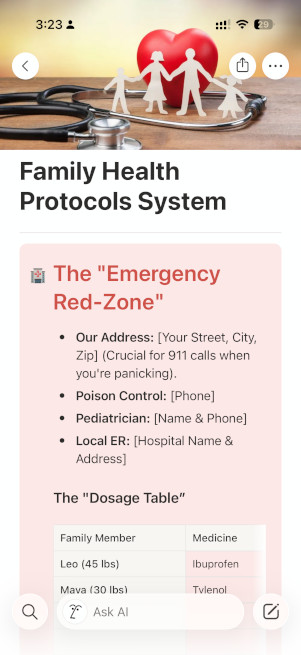
An External Brain is a central, digital dashboard where all your family’s health information lives. Instead of relying on your memory when you’re exhausted, you rely on a system. In my house, we use the Family Health Protocols System. Here are the four pillars that make this system a lifesaver.
- Information Rescue (The Digital Med Index)
How many times have you dug a medicine box out of the trash just to read the dosing chart?
In a proactive system, the second a new bottle enters the house, you rescue the information. Scan the box, take a photo of the dosing chart, and attach it to a digital card for that medication. Now, the chart lives in your pocket, not the landfill.
- Automatic Dosage Math (The Game Changer)
This is the feature parents love most. Because pediatric medicine is weight-based, not age-based, the "correct" dose is always a moving target.
In a digital system like Notion, you can build a Dosage Table. You update your child’s weight and the exact "ml" once and it updates automatically for every protocol—Tylenol, Motrin, and Saline—instantly. At 3 AM, you don't need a calculator; you just need to read the screen.
- Symptom Logic
A system is only good if you can use it while you’re half-asleep. Instead of looking for "files," look for Symptoms.
- Tap a button labeled "Cough."
- Immediately see the Red Flags (when to call the doctor), the home remedies you trust, and the dosage table.
- The Handoff: Since the system is digital, your partner or the babysitter can see exactly what was given and when. No more "double-dosing" fears.
From Project Manager to Parent
Managing your family’s health shouldn’t feel like a second full-time job. When you outsource the logistics to a system, you free up your brain to do what it was actually meant to do: provide comfort and care.
Ready to start your system?
If you want to build this yourself, start by centralizing your most-used dosing charts today. Or, if you want to skip the setup and get organized right now: